Expressive Ink Painting Guide
Turn Your Travel Photo Into Expressive Chinese Ink Painting
This step-by-step guide walks you through using Imagild’s Expressive Ink Memory Skill to convert a real travel photograph into a Chinese expressive ink painting, with clear notes on what stays recognizable, what shifts to brush gesture, and what you should verify before using your final output.
At a Glance
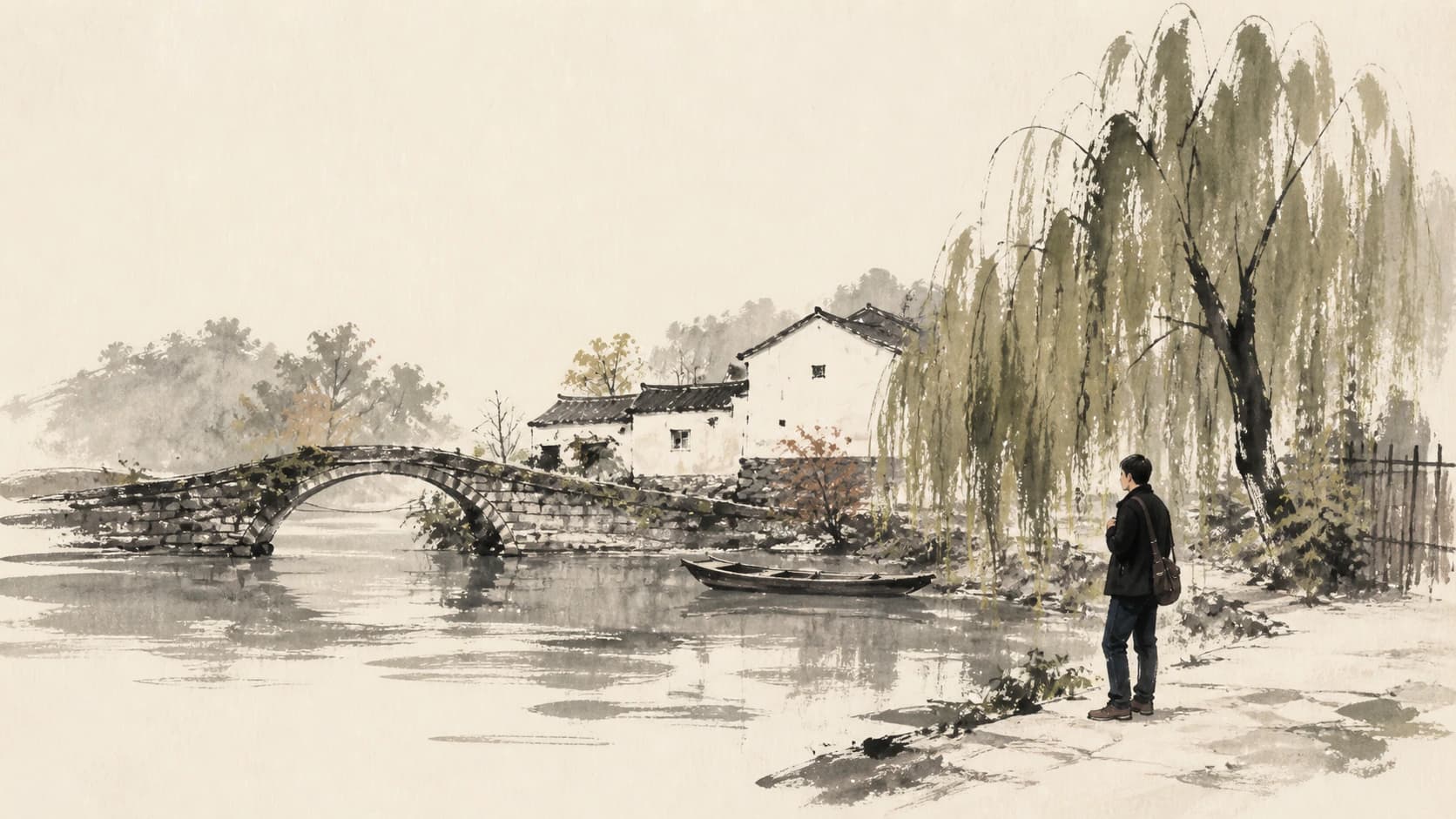
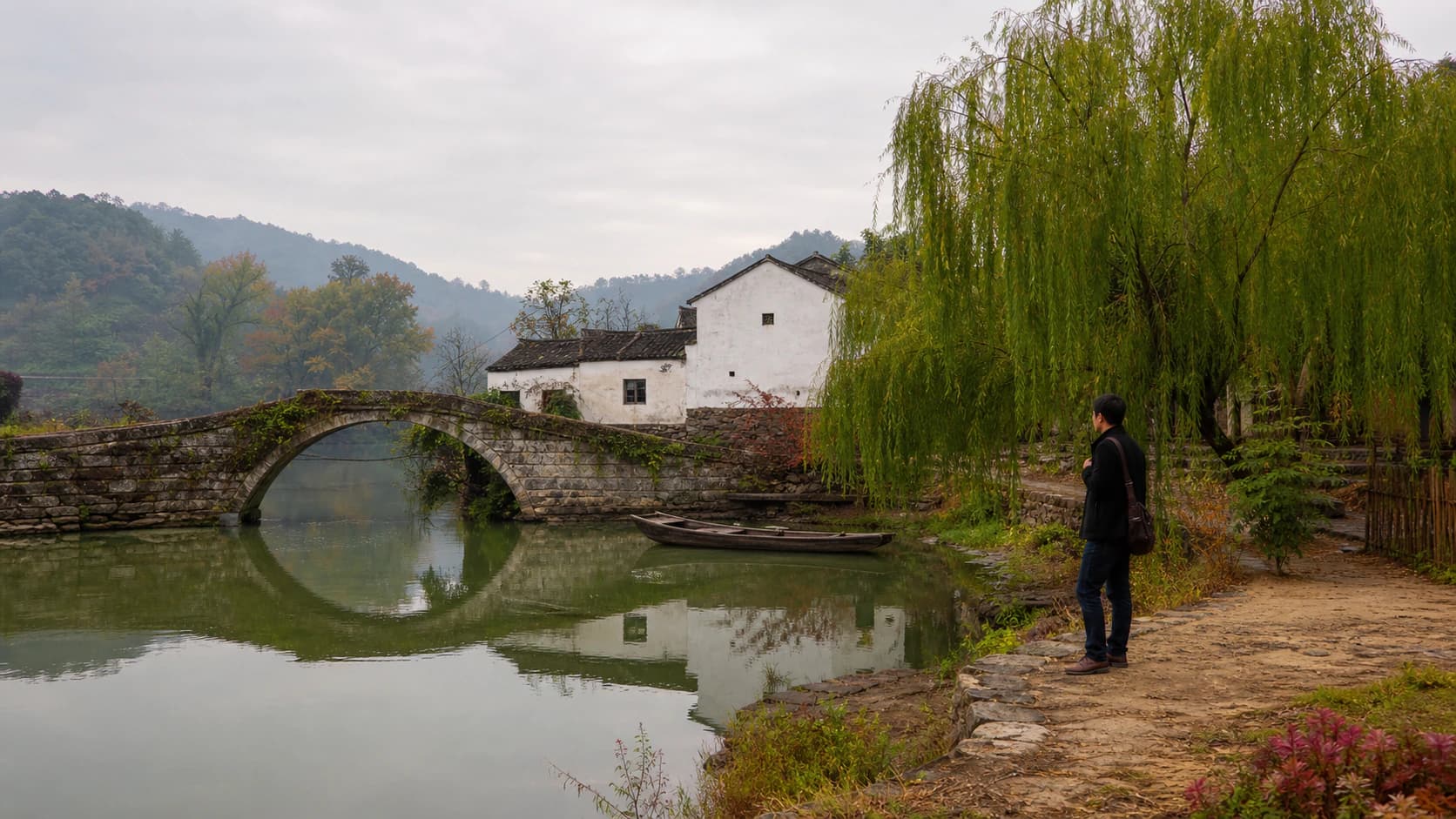
This guide shows you how to turn a travel photo into expressive Chinese ink art using the Expressive Ink Memory Skill, while checking that key landmarks and people stay recognizable after the brush-driven simplification. In the reviewed before-and-after pair, the source is a waterside village scene with a stone arched bridge, white buildings with dark roofs, a willow, a small boat, reflective water, and one standing person.
Real Before-and-After Evidence
The original source image is a calm waterside village scene featuring a curved stone arched bridge, connected white buildings with dark sloped roofs, a leafy willow tree on the left bank, a small moored wooden boat, soft water reflections, and one person standing near the water’s edge. The reviewed generated result retains the distinct curve of the bridge arch, the rhythmic spacing of the white house forms, the dense dark mass of the willow, the small boat’s position on the water, the overall direction of the water flow, and the standing figure’s exact placement relative to surrounding elements. Every fine surface detail from the photo is replaced with broad, textured ink masses, visible dry-brush breaks that echo calligraphic movement, very restrained patches of muted color, and large areas of untouched white paper that give the work its quiet, open feeling. This is not a pixel-level copy or a documentary reconstruction: roof edges, window shapes, and clothing details are simplified away to serve the expressive brush style.
Step-by-Step Workflow
- 01
Open the Expressive Ink Memory Skill
Start at the public Skill path /skills/expressive-ink-memory on Imagild’s web platform. The published Skill is available directly from this page without separate technical setup. This dedicated Skill is built for exactly this kind of photo-to-ink-painting transformation, and it is ready to use as soon as the page loads for any signed-in or browsing visitor.
- 02
Upload your travel source photograph
Use the input mode for source photographs to add your travel image. For best results, choose a photo where your key place-defining elements are clearly visible and unobscured: bridges, distinctive buildings, notable trees, boats, or people you want to remain part of the final composition. Blurry or heavily cropped source photos may make it harder for the Skill to anchor the final ink interpretation to the locations you care about.
- 03
Run the transformation, compare, and save
Initiate the generative transformation and wait for your result to load. Once it appears, place it side by side with your original photo to confirm the elements you care most about are still recognizable. If you are satisfied with the balance of expressive brush work and recognizable scene anchors, save the accepted result to your signed-in Imagild Library for later access and export.
Key Pre-Use Decisions
- Choose which place-defining anchors you need to keep
- Before you run the Skill, decide which elements of your travel photo are non-negotiable for you. For a village scene like the sample, that might be the arched bridge, the willow, the small boat, and the standing person. If you are working with a different travel location, your anchors could be a specific mountain silhouette, a historic gate, a waterfront promenade, or a group of people you traveled with. Writing these down before you start helps you evaluate results consistently.
- Accept that fine details will shift to calligraphic gesture
- This Skill does not produce a faithful architectural record or a documentary photo print. Fine details like individual window frames, clothing patterns, small text on signs, and exact stone texture are deliberately replaced with broad brush strokes, dry-brush breaks, and open negative paper that align with the tradition of expressive Chinese ink painting. This shift is not an error; it is the core creative choice that gives the final work its hand-painted, calligraphic character.
- Verify every result against your source before sharing or publishing
- No two generative runs will produce exactly the same ink interpretation, and not every output will preserve all of your chosen anchors in the way you expect. Always compare the generated result directly with your original photo to confirm the person, bridge, boat, and building relationships match your memory and your intended composition. If a key element feels unrecognizable, you can run the Skill again with the same source photo to get a new expressive interpretation to evaluate.
Official sources checked
Frequently Asked Questions
Can I use this Skill to turn any travel photo into a Chinese expressive ink painting?
You can use any clear travel source photo as input, but results work best when your image has distinct, unobscured landmarks and subjects that give the Skill strong visual anchors to reference. Busy, overcrowded, or heavily backlit photos may produce ink interpretations that lose track of the specific place-defining details you want to keep. You will always need to compare the output with your original to confirm the elements you care about remain recognizable.
Is this transformation a filter that applies a fixed ink effect over my original photo?
No, this is a generative Skill, not a deterministic filter. It does not simply overlay a paper texture or a brush stroke preset on top of your existing pixels. Instead, it reinterprets your entire scene using the logic of calligraphic brush movement, broad ink masses, and large areas of untouched negative paper. That means each run can produce a slightly different expressive arrangement, rather than a predictable, uniform effect applied to every image the same way.
What should I do if the standing person in my travel photo is no longer recognizable in the ink result?
First, compare the position and general silhouette of the figure against your original photo to see if the person’s placement and basic shape are still intact. If the figure has lost too much distinctness, you can run the Skill again with the same source photo to generate a new interpretation. You can then open the result in the photo workbench to make gentle manual adjustments to exposure, contrast, or sharpness to help the figure’s ink form read more clearly against the surrounding paper and brushwork.