Retro Panel Force
Turn a skateboard action photo into a retro comic panel without changing the trick
This guide walks you through using Imagild's Retro Panel Force Skill to turn a real skateboard action photo into a restrained, print-inspired retro comic panel that preserves the full original trick, no extra story elements added.
Fast start explanation
This step-by-step guide shows you how to use the Retro Panel Force Skill to convert your skateboard action photo into a retro comic panel that keeps the original airborne pose, board angle, and low viewpoint without adding speech bubbles or unrelated styling.
Real before-and-after evidence
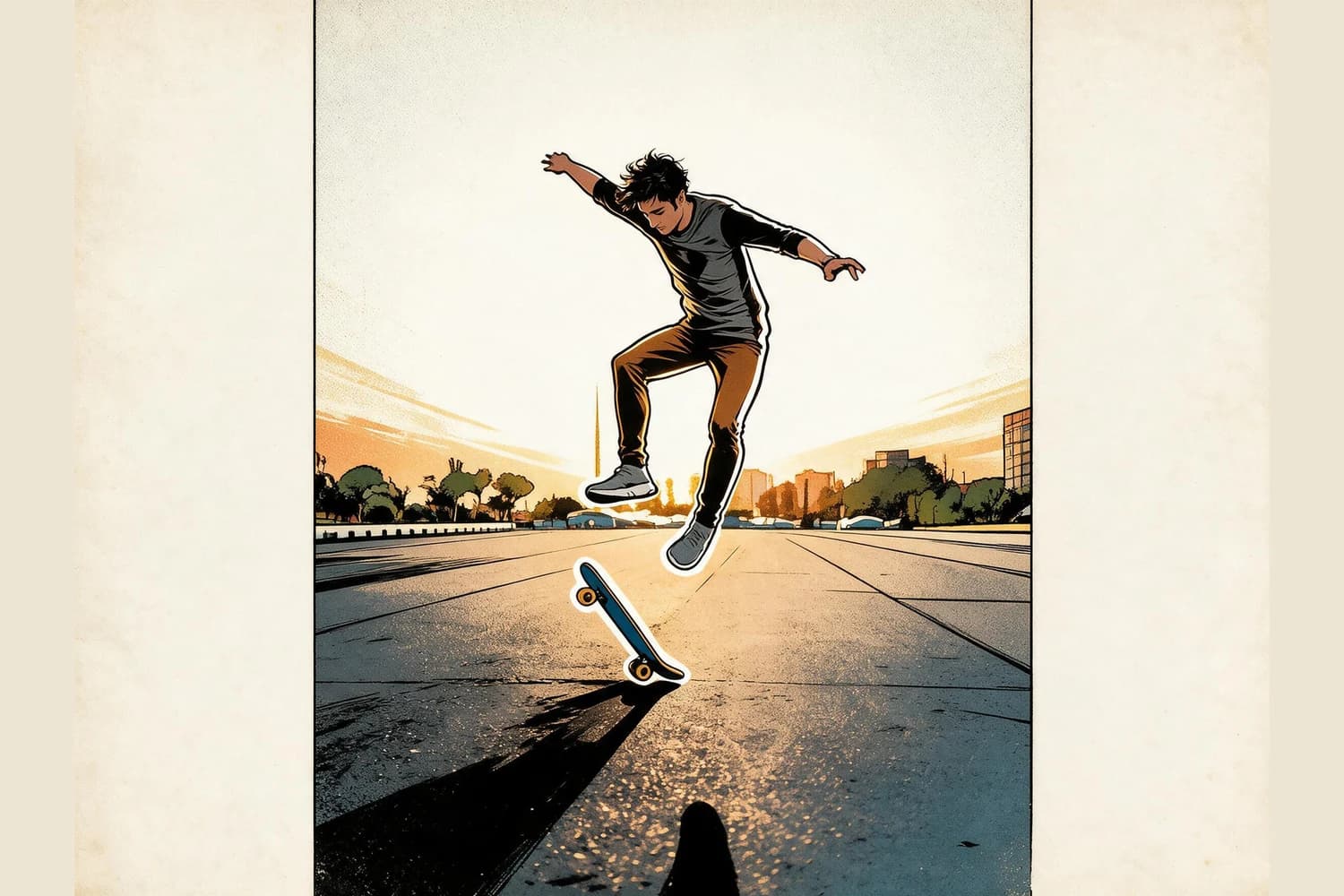
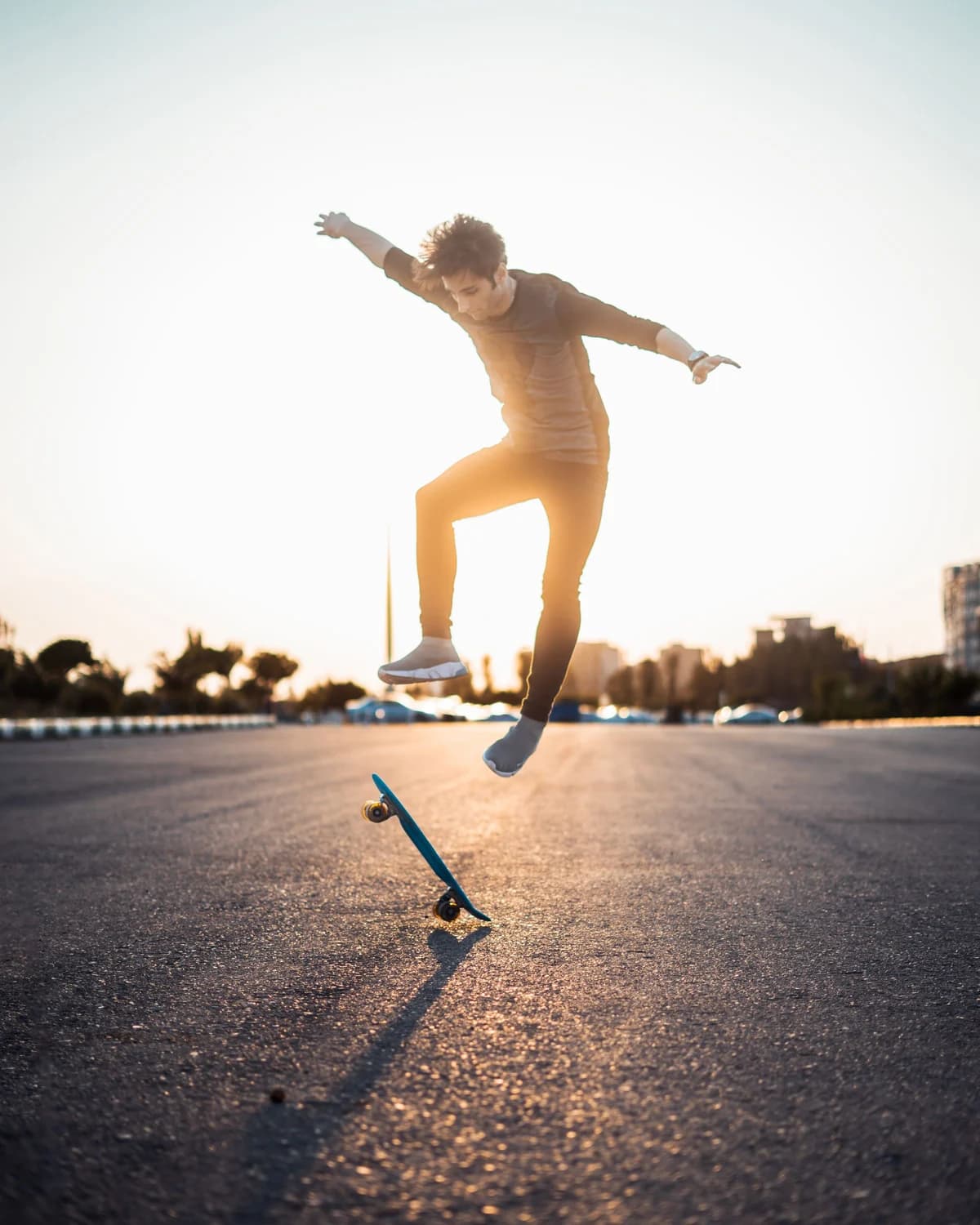
The curated source photo shows one skateboarder fully airborne above a tilted skateboard, both arms extended to stabilize the trick, with a long distinct ground shadow that traces the path of movement across an open paved plaza under a warm sunset sky. The published result from the Retro Panel Force Skill keeps the single person, exact airborne pose, original board angle, low camera viewpoint, sunset direction, and open plaza setting, but reworks the scene into bold simplified inked masses and muted, offset print-style color. No speech bubbles, sound effect text, custom costumes, brand logos, or extra comic panels appear anywhere in the output, so the final image remains a visual record of the photographed real action rather than an invented fictional sequence. You can compare the full unedited source and result directly through the public Skill page to confirm these details for yourself.
Step-by-step workflow
- 01
Open the public Retro Panel Force Skill page
Open the published Skill at /skills/retro-panel-force and review its official before-and-after sample pair. Compare the airborne pose, board angle, low camera viewpoint, sunset direction, ink contours, and muted print colors before providing your own action photo.
- 02
Upload your skateboard action source photo
Select a photo that captures a clear peak action moment, with the skateboarder's full body, the board, and the surrounding movement context all visible in the frame. For best results, choose a shot where the trick is fully defined, the camera angle is intentional, and the lighting casts a distinct shadow that reinforces the sense of motion, just like the curated Pexels source photo by Milad Mohammadi used in the public sample.
- 03
Run the Skill and review your generated result
Start the generative transformation, then wait for the output to load. Once your result appears, compare it side by side with your original photo to confirm the key action details are intact. If you are signed into your Imagild account, you can save any result you accept to your personal Library for the platform's stated retention period, and you can re-run the Skill with the same source photo to generate alternative variations if you want to explore different print texture weights.
Key pre-use decisions
- Decide which core action details you need to preserve before you start
- Before you upload your photo, note the exact airborne pose, board tilt, camera height, direction of light, and background context that make your specific trick shot unique. This gives you a clear checklist to reference after generation, so you can quickly confirm that the Skill has retained the movement you photographed instead of softening or shifting the critical action details that make the image feel authentic.
- Accept that fine background details will be simplified into retro comic styling
- The Skill does not keep every tiny background object, subtle color gradient, or sharp texture from your original photo. Instead, it reworks the scene into bold inked shapes and muted, offset print-style color that echoes the restrained aesthetic of classic printed comic panels. This deliberate simplification is what gives the final image its retro character, but it also means minor background elements you did not notice in your source may be merged or removed in the output.
- Verify no unwanted text or extra elements appear in your final output
- The published Retro Panel Force Skill is configured to avoid adding speech bubbles, sound effects, custom logos, or extra panel borders, but generative transformations can occasionally introduce unexpected small details that do not match the curated sample. Take 10 to 15 seconds to scan the full frame of your result before you save or share it, so you can catch any stray marks or odd additions and re-run the Skill if you want a cleaner version.
Official sources checked
Frequently asked questions
Can I use this Skill to turn other action sports photos, like BMX or parkour shots, into retro comic panels too?
Yes, you can upload any real action photograph that has a clear peak movement moment and distinct subject silhouette. The Skill is designed to apply the same retro print-inspired simplification to the scene, though you should still verify that the core pose, equipment angle, and camera perspective you cared about from the original photo are preserved in the generated result, since performance can vary depending on how complex your source image's composition is.
Why does this Skill not add speech bubbles or superhero costume styling like other comic conversion tools I have tried?
In the reviewed sample, the airborne pose, board angle, low viewpoint, sunset direction, and open plaza remain recognizable while texture is simplified into ink masses and muted print colors. Treat that pair as evidence for the sample only, then compare the same action details in your own result before accepting it.
What should I do if my generated result changes the skateboard trick instead of keeping it intact?
First, double check that your original source photo has the full body, skateboard, and key movement details all clearly visible and unobscured in the frame. If part of the board or the skater's feet are cut off, the Skill may not have enough visual information to lock in the exact trick. Re-upload a more completely framed version of the same shot and run the Skill again, then compare the new result against your pre-written checklist of critical action details to confirm it matches what you photographed.