Photo Transformation Guide
Turn a Daylight Portrait Into a K-Pop Night Route Direct-Flash Snapshot
This step-by-step walkthrough uses the official Imagild K-pop Night Route Snapshot Skill to convert a static daytime full-body portrait into the kind of unplanned, energetic fan-taken snapshot that feels captured outside a late-night venue, with a lifted hand wave, wind-shaped hair, and a busy dark background of soft-focus passersby. Every generated output requires a quick visual check before you share, because fine details like hand anatomy, facial expressions, and background figure placement will shift from your original source.
Quick Answer
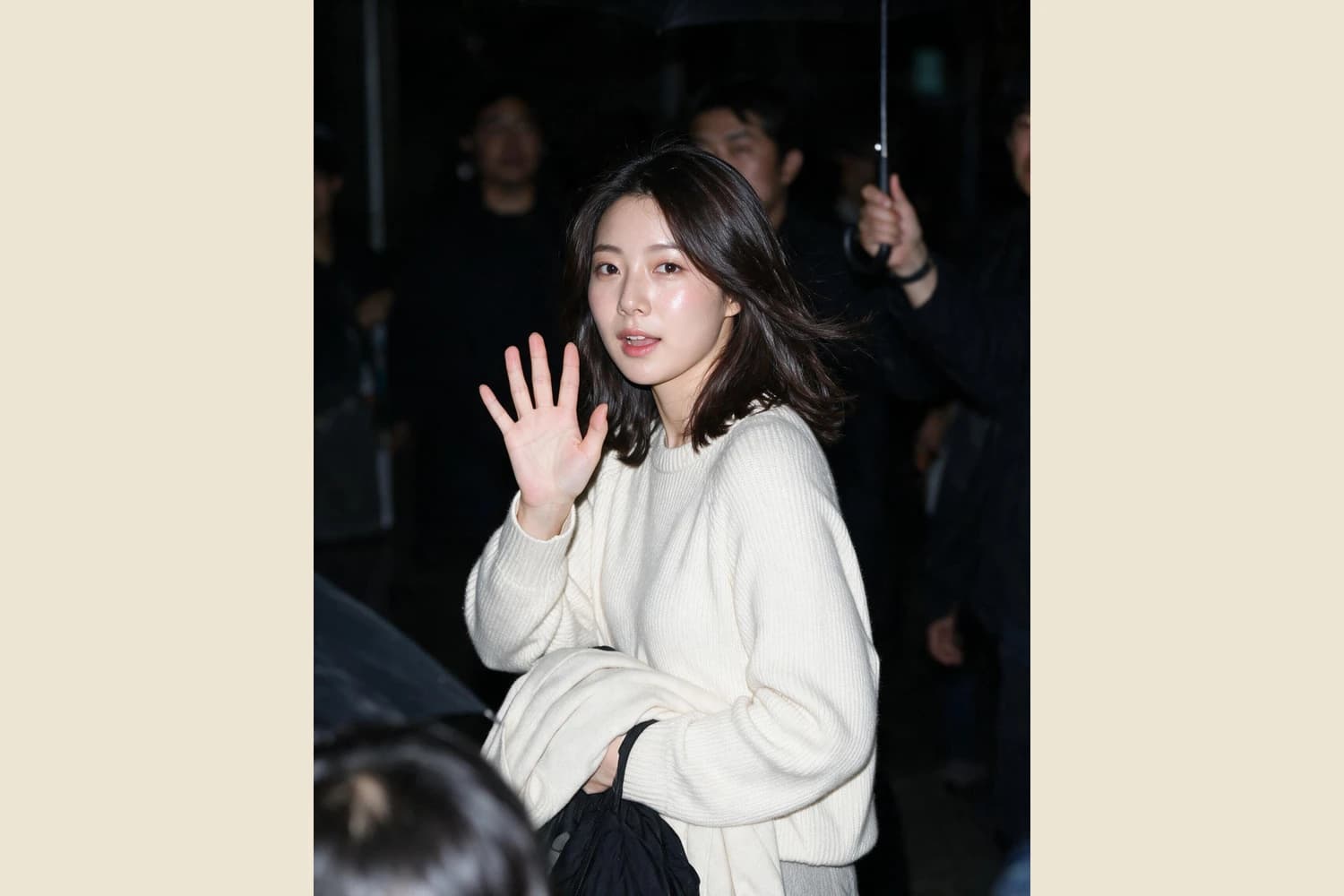
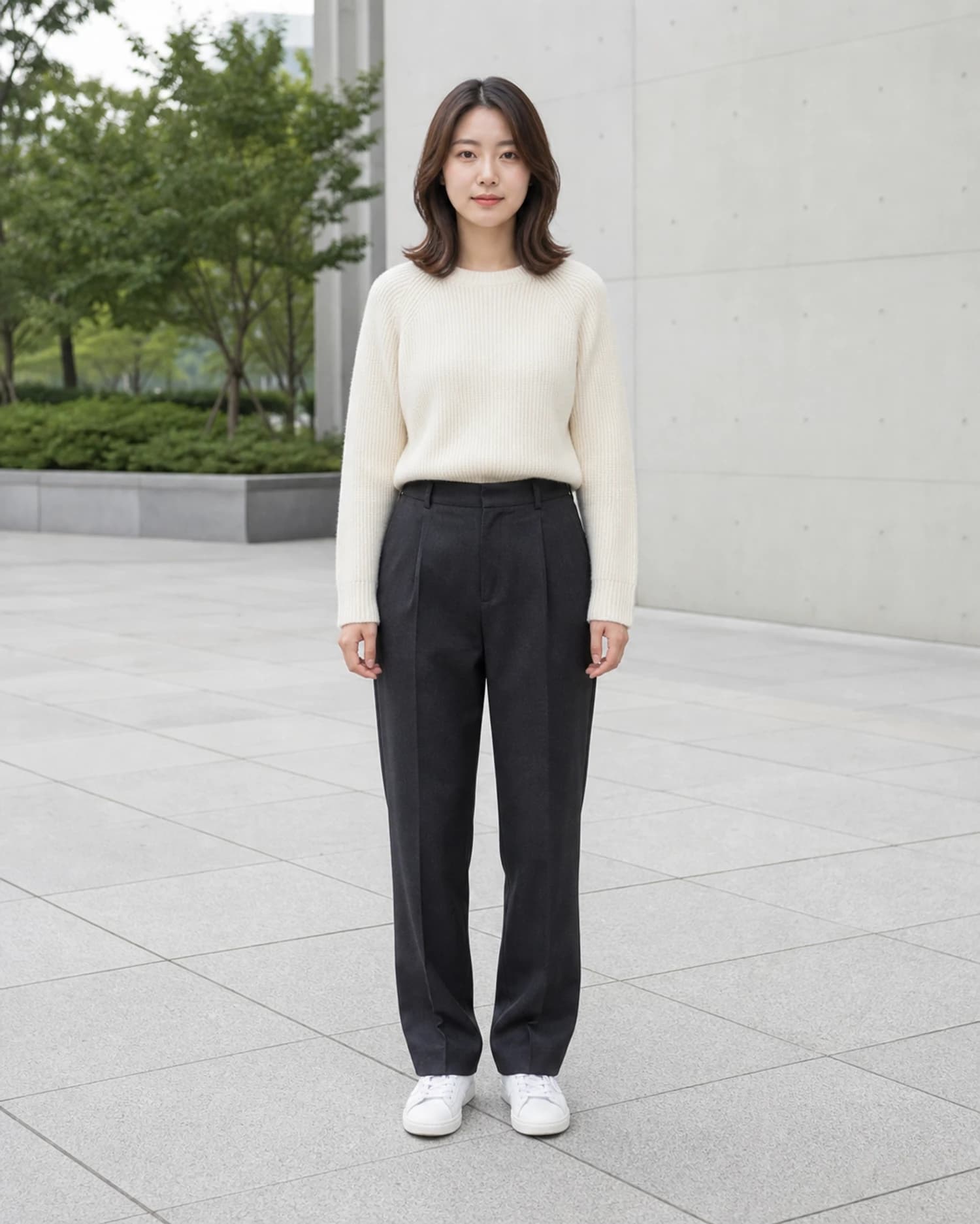
This Skill converts your posed daylight portrait to an upper-body night direct-flash snapshot with a raised hand, wind-shaped hair, and soft-focus background people. Review the face, hand, and framing before saving to confirm it matches your intent. In the reviewed before-and-after pair, the source is a front-facing full-body daylight portrait of one adult subject in a cream ribbed sweater, charcoal trousers, and white shoes beside trees and a pale concrete wall.
Reviewed Before-and-After Evidence
The curated source image is a front-facing full-body daylight portrait of one adult subject wearing a cream ribbed sweater, charcoal trousers, and white shoes, positioned next to leafy trees and a pale concrete wall. The reviewed generated result shifts the framing to an upper-body night scene, keeps the subject in the same cream ribbed sweater, and places them against a dark, low-light background filled with several soft-focus out-of-focus people and a clearly visible handheld umbrella. A bright frontal direct flash illuminates the subject’s face and sweater to create that classic candid route-shot contrast against the dark surroundings. The reviewed result differs from the source in several clear, observable ways: the subject’s pose turns slightly toward the camera, one hand is raised in an open wave, the hair is reshaped to look tousled by moving air, the lower body is no longer visible in the tighter upper-body crop, and the surrounding background figures do not appear anywhere in the original daylight scene. This is a fully generated creative transformation, not a documentary photograph, so no part of the output should be presented as a real unedited capture of the original moment.
Step-by-Step Workflow
- 01
Open the K-pop Night Route Snapshot Skill
Navigate directly to the public Skill page at /skills/kpop-night-route-snapshot from your browser, or locate it through the Imagild Skills library under the portrait transformation category. Take a moment to review the embedded before-and-after sample pair on the Skill landing page so you understand the baseline creative direction before you upload any of your own photos. Confirm you have explicit consent from the person in your source photo to create and share a modified portrait, and that your source image is a clear, front-facing shot taken in even daylight for the most consistent starting point.
- 02
Upload your source portrait and run the transformation
Use the Skill’s upload interface to select your own posed daylight portrait, then initiate the generative transformation. The Skill will automatically produce a new output that recontextualizes your subject within the night route snapshot visual language. You do not need to adjust any additional settings during this step, as the published Skill follows a fixed, pre-defined creative direction built around the direct-flash night aesthetic. The process will use one image credit from your account balance if you are generating a new custom output, and the result will appear on screen once processing is complete.
- 03
Review, refine if needed, and save your accepted output
Compare the generated result side by side with your original source photo. Inspect the subject’s face to confirm the likeness is recognizable and matches your expectations, check the raised hand for any anatomical inconsistencies, and verify that the background crowd and umbrella elements feel natural rather than distracting. If the first generated candidate does not meet your standards, you can run the Skill again to produce a new variation. Once you are satisfied with the output, save it to your signed-in Imagild Library, where it will be stored for the platform’s stated retention period before you export it in your preferred file format and size.
Key Creative Decisions to Make Before You Start
- Choose a source photo that preserves your subject’s core identity
- Pick a daylight portrait where the subject’s face is clearly visible, unobscured by hats or masks, and lit from the front to give the Skill the strongest possible reference for retaining recognizable facial features. A full-body or medium shot works best, because the Skill will reframe the output to an upper-body crop, and you will not lose the core of the subject’s pose even though the lower legs and feet from the original source will no longer appear in the final snapshot. Avoid heavily backlit or blurry source photos, as these can make it harder for the transformation to lock in a consistent likeness.
- Accept that specific elements will change to serve the candid snapshot aesthetic
- Understand that the Skill is designed to introduce deliberate, creative changes that move your image away from a polished posed portrait and toward a spontaneous fan-captured moment. The subject’s hair will be reshaped to look wind-blown, a hand will be added or repositioned to create a natural wave, the lighting will shift to a harsh frontal direct flash, and the original trees and concrete wall background will be replaced with a dark night scene containing multiple soft-focus background people. None of these changes are errors; they are core parts of the intended creative effect.
- Plan for a verification step to catch small generative inconsistencies
- All generative transformations can produce small unexpected details that do not match real-world physics, so you must set aside 30 to 60 seconds after generation to inspect the full frame. Pay extra attention to the raised hand, since generated hands occasionally have misplaced fingers or odd proportions that break the realism of the candid shot. Also scan the background figures to make sure they do not have distorted faces or distracting artifacts, and confirm that the subject’s sweater detail remains consistent with the original source. If you spot an issue you cannot accept, generate a new candidate rather than trying to edit the flaw manually.
Official sources checked
Frequently Asked Questions
Can I use this Skill on a photo where the subject is not wearing a sweater?
Yes, you can upload any front-facing daylight portrait of a single subject regardless of their clothing, but the curated sample pair uses a cream ribbed sweater as the source reference. The Skill will adapt the clothing to fit the night route snapshot aesthetic, though you should still verify that the final outfit looks natural and matches what you expected after the transformation completes. If you want to preserve a very specific garment, make sure it is clearly visible in your source photo before you run the Skill.
What should I do if the generated hand in my output looks distorted?
If the raised waving hand has misplaced fingers, odd proportions, or other visible inconsistencies, simply run the Skill again to generate a new independent candidate. Each new generation produces a unique variation, so the hand pose and anatomy will almost always be different on the second or third attempt. You can also use the Imagild photo workbench’s restrained portrait repair tools to make targeted adjustments, but generating a fresh candidate is usually the fastest way to get a natural-looking hand.
Am I allowed to share the final generated snapshot on social media?
You may share your final output only if you have full consent from the person featured in the photo, and you use the content in line with the Imagild Acceptable Use Policy. Because this is a generated creative transformation and not a documentary photograph, you should avoid presenting the image as a real unedited capture of a specific public event or moment that never actually happened. Always make reasonable disclosures if your audience would reasonably assume the photo is an unmodified real candid shot.