Marker Rebel Guide
Turn a portrait into a compact four-color chibi marker sketch with Marker Rebel
This walkthrough uses a real published before-and-after pair from Imagild’s Marker Rebel Skill to show which familiar portrait anchors tend to survive heavy proportional simplification, which details shift, and what you should check before you save your final chibi sketch.
Quick Answer
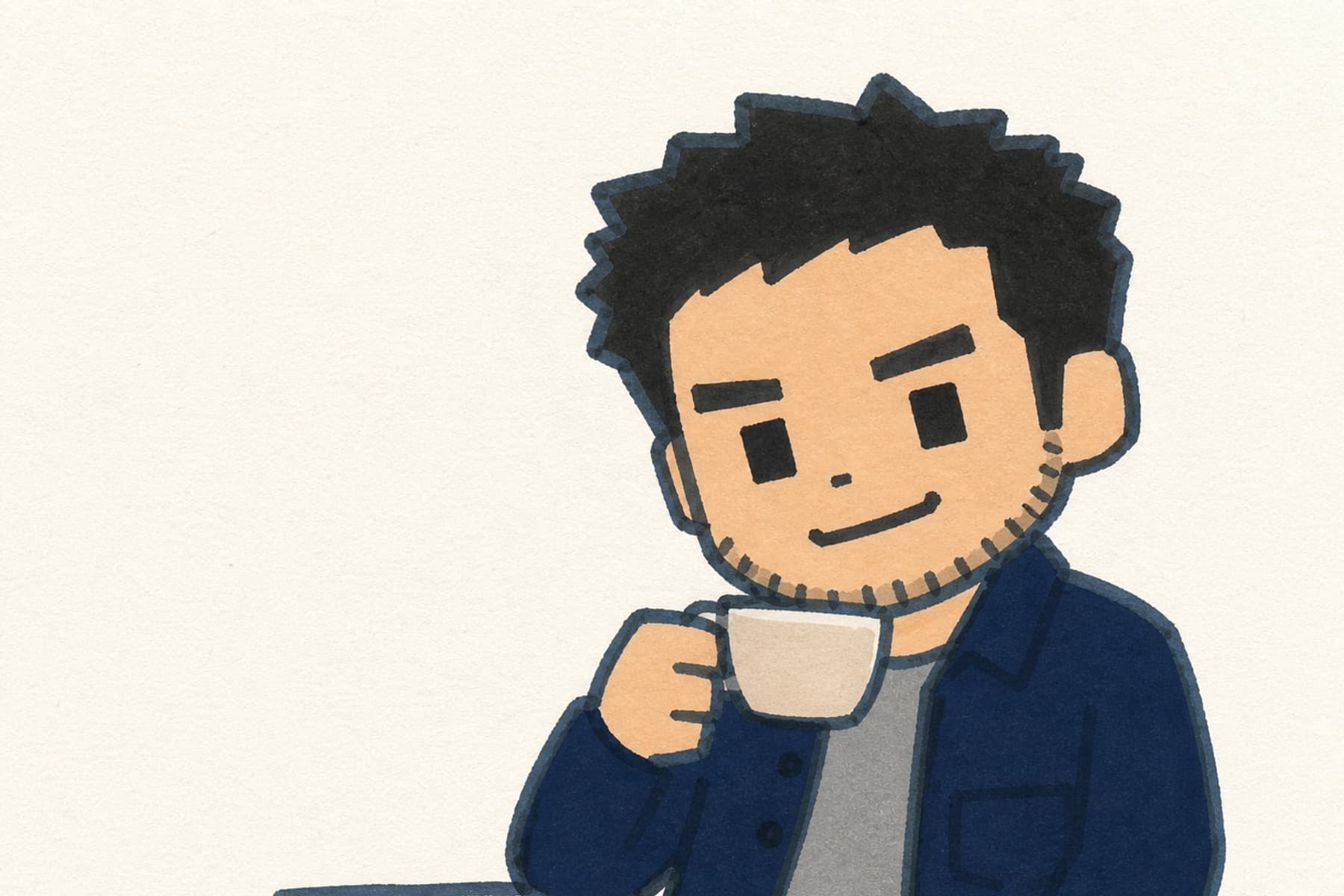
Marker Rebel transforms your source portrait into a compact chibi marker sketch on cream paper, removing complex backgrounds and retaining key recognizable anchors like hair mass, a held mug, and outerwear while simplifying fine facial and hand details. In the reviewed before-and-after pair, the source is a smiling man seated by a lake, holding a light ceramic mug, with short dark wavy hair, facial stubble, a navy overshirt, and a gray T-shirt.
Real Before-and-After Proof
The original source photo shows a smiling man seated by a lake, holding a light ceramic mug, with short dark wavy hair, visible facial stubble, a navy overshirt, and a gray T-shirt. The published result shows one chibi figure holding the same style of light mug, retains the dark hair mass, distinct stubble marks, navy outer layer, and gray shirt, and preserves the bent hand-to-cup relationship on a plain cream paper surface. The original lake and surrounding outdoor background are fully removed, facial geometry is softened and simplified, fine hand anatomy is reduced to a sketch-friendly shape, and no wording, speech bubble, logo, or second character appears anywhere in the final frame.

Step-by-Step Workflow
- 01
Open the Marker Rebel Skill page
Navigate to the public Skill at /skills/marker-rebel in your web browser to view the published before-and-after sample and confirm the visual direction matches the chibi marker style you want. You can review the existing source and result pair to set realistic expectations before you upload any of your own photos.
- 02
Upload your chosen portrait photo and run the transformation
Provide a source portrait you have the right to use and run the transformation. When the result appears, compare it with the published marker-style sample and your source, paying particular attention to the mug, hair, stubble, clothing, hands, and background.
- 03
Review your output and save it to your Library
Compare the generated result directly against your original photo to check which anchors came through as expected. Confirm that recognizable elements like hair mass, a held object, or specific clothing are present, and note that fine facial and hand details will be simplified. If you are satisfied with the output, save it to your signed-in Imagild Library for your own access and use.
Key Decisions Before You Run the Skill
- Pick 2 to 3 clear anchors you want the sketch to retain
- Before you upload your photo, decide which specific elements matter most for keeping the result recognizable. In the sample, the user prioritized the dark hair mass, the light ceramic mug, the stubble marks, the navy outer layer, and the gray shirt. Choosing a small, focused set of anchors helps you evaluate outputs consistently instead of expecting every minor detail from the original photo to carry over.
- Accept that fine facial and hand details will be deliberately simplified
- This Skill is designed for compact, playful chibi marker sketches, not photorealistic portraits. Exact facial geometry, individual stubble lines, and precise hand anatomy are not preserved in the final style. If you need a close likeness for formal identification or a highly detailed portrait, this specific transformation is not the right tool for that use case.
- Verify the output for unintended additions and missing elements before saving
- After your result generates, check the full frame carefully. Confirm no unexpected text, logos, speech bubbles, or extra characters appear, and make sure none of your chosen recognizable anchors are missing. You are responsible for reviewing likeness, hand detail, and any generated content before you use or share the final sketch, and for confirming you have the right to transform and publish the original source photo.
Official sources checked
Frequently Asked Questions
Will Marker Rebel keep the exact face of the person in my source photo?
No. The transformation simplifies facial geometry heavily to fit the compact chibi marker sketch style. It can retain recognizable broad traits like hair mass and stubble marks, but it will not produce an exact facial likeness. You should always review the output to confirm the level of recognizability meets your needs before you use it.
What happens to the original background in my portrait photo?
The original background is removed entirely. The published sample replaces the lakeside outdoor background with a plain cream paper surface that matches the marker sketch aesthetic. No elements from the original background appear in the final chibi output.
Can I use this Skill to turn any photo of a person into a chibi marker sketch?
You can submit a wide range of portrait photos, but results will vary. The sample evidence only confirms reliable retention of the specific visible anchors shown: hair mass, stubble marks, a light mug, a navy outer layer, and a gray shirt. You should test your specific photo and review every output carefully to confirm it meets your expectations before saving.