One-photo pet scrapbook guide
Turn one pet photo into an illustrative scrapbook without inventing memories
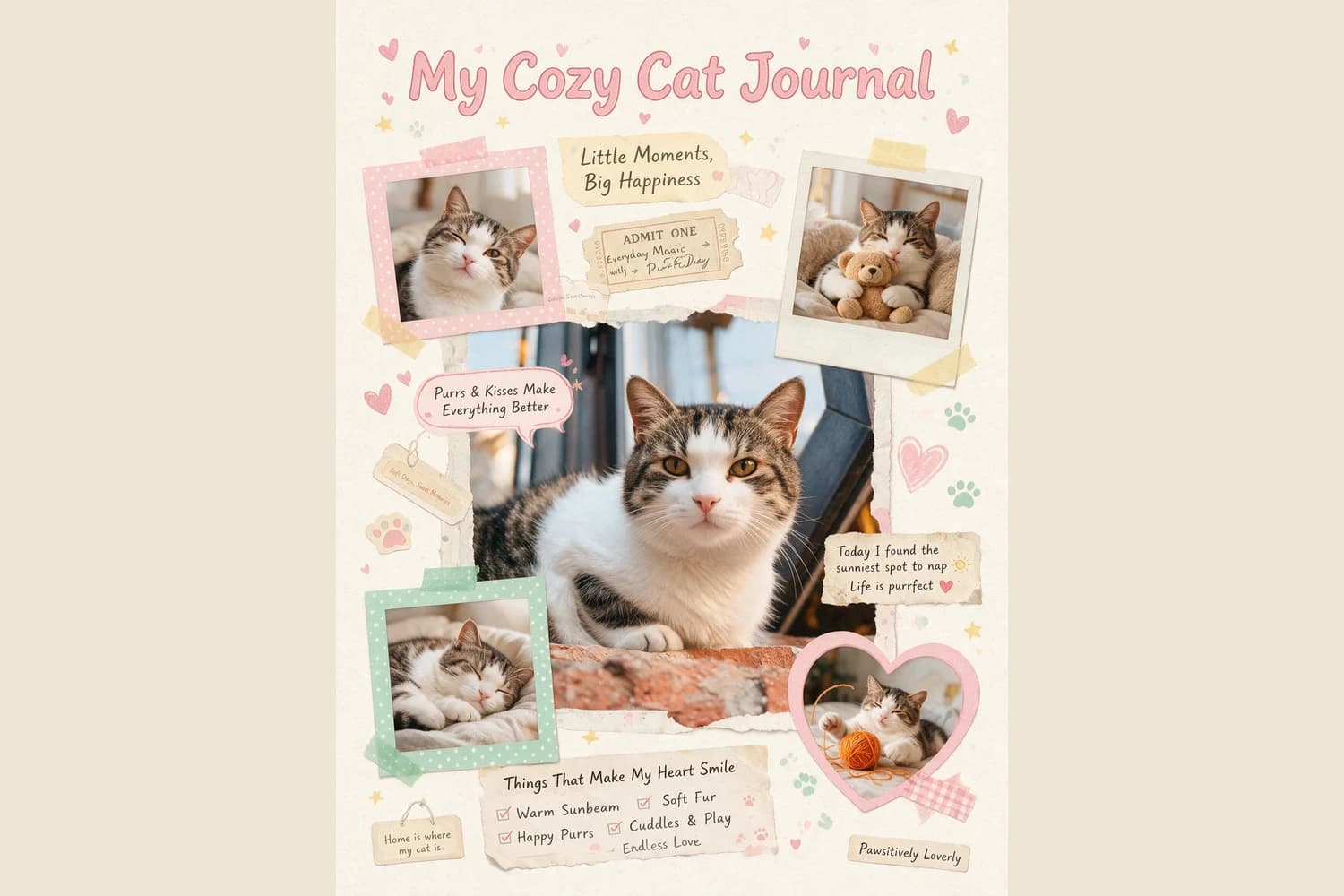
A generated scrapbook can make one pet portrait feel like a full page of visual storytelling. The important editorial choice is to keep the source photograph traceable and label the extra scenes for what they are: new illustrations, not additional photographs from the pet's life.
The short answer
Start with a pet photo where the face, ears, coat pattern, body position, and setting are easy to compare. Apply Pet Companion Scrapbook, then treat the large portrait as the source-linked view and every new pose, prop, caption, or room as a generated illustration. Add real names, dates, and memories later as checked text.
What the reviewed cat example can and cannot show
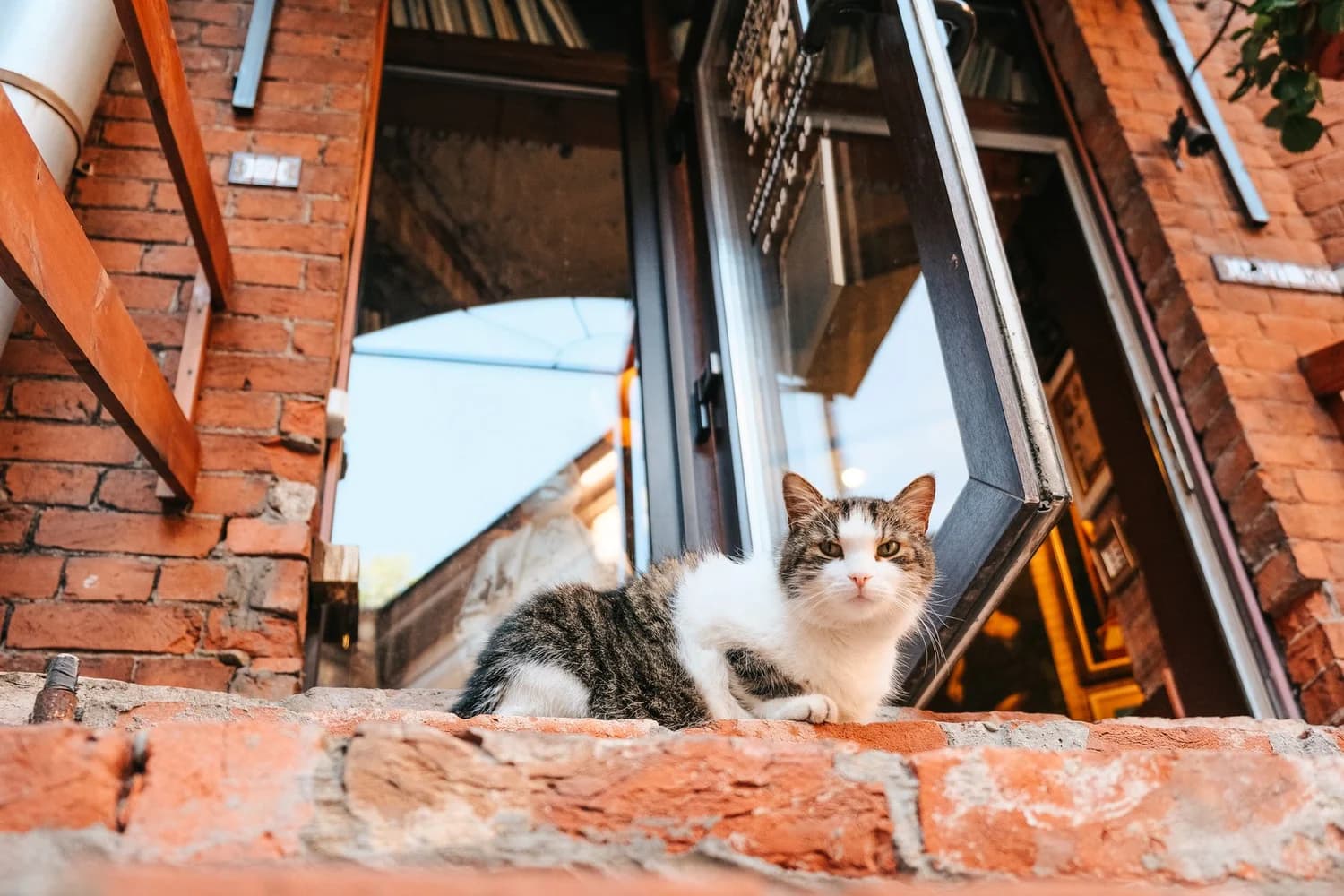
The source photograph by Alexandra Kollstrem shows one white-and-tabby cat crouched on a brick ledge outside a building. Its upright ears, direct gaze, white chest and face, dark tabby patches, front paws, brick edge, and open window are all visible. The Imagild result keeps a large central cat portrait that can be compared with those features. It also adds four smaller scenes: a tilted close-up, a cat holding a teddy bear, a sleeping cat, and a cat beside yarn. Those poses, props, and indoor settings do not appear in the source. They are generated variations. The result also contains decorative English phrases, which are visual copy rather than verified facts about this cat.
A source-aware three-step workflow
- 01
Choose a photograph with checkable recognition cues
Use a frame in which the pet occupies enough of the image to compare the face, ear shape, coat markings, body outline, and visible accessories. Note the actual setting and pose before generating. For this reviewed pair, the dependable facts are one cat, an outdoor brick ledge, a crouched position, a direct gaze, and a specific white-and-tabby pattern. A single example does not establish how every cat, dog, or other animal will be rendered.
- 02
Run the Skill and separate source-linked content from additions
Open Pet Companion Scrapbook and use the chosen photograph. When the result appears, compare the large portrait first. Then make a separate list of anything new: sleeping poses, toys, yarn, blankets, interior backgrounds, labels, or speech bubbles. New material can support an illustrative page, but it should not be described as another photograph, another day, or an event that actually happened. This distinction matters most when the page is intended as a personal record.
- 03
Replace factual wording and decide how the page will be used
If the pet's name, adoption date, location, or a quotation must be correct, place that wording in a layout application after accepting the visual result. Check spelling, punctuation, and legibility at the intended display size. The Imagild output is a raster illustration, not an editable scrapbook template or a physical album. If you later make a physical keepsake, choose mounting and storage materials separately; the Library of Congress guidance covers that preservation task.
Three decisions that keep the page honest
- Decide whether you need a record or an interpretation
- Use real photographs for a chronological or documentary album. Use a generated scrapbook when you want one photograph reinterpreted as a decorative page. The small scenes may evoke a pet's personality, but they do not verify that the pet slept on that blanket, held that toy, or played with that yarn.
- Compare visible features without claiming exact identity
- The reviewed result retains comparable white-and-tabby coloring, upright ears, a broad white face, and a similar gaze in several panels. Other details change across the smaller scenes. Describe that visible comparison, not biometric identity or exact likeness. A pleasing resemblance in one result is not a promise for another source photograph.
- Keep digital styling separate from physical preservation
- Paper textures, tape, tickets, hearts, and photo frames in the generated image are visual motifs made of pixels. They do not make an archival object or specify safe adhesives, paper, sleeves, or storage. For a physical album, follow preservation guidance and keep the original photograph or file separately from the decorative derivative.
Official sources checked
Questions about one-photo pet scrapbooks
Are the smaller pet pictures real photos from the source?
No. In this reviewed example, the source contains one outdoor pose. The smaller scrapbook panels introduce a teddy bear, sleeping scene, yarn, bedding, and altered poses. They are generated illustrations and should not be captioned as separate photographed events.
Can I add my pet's real name and dates?
Yes, but add or replace that text after generation in a layout application when accuracy matters. Check every name, date, place, and quotation yourself. Generated lettering can look plausible while containing wording that was never supplied or verified.
Is the result ready to use as a physical archival scrapbook?
No. The delivered result is a raster image with simulated paper and mounting elements. Physical preservation requires separate choices about paper, photo corners, sleeves, adhesives, storage, and printing. The linked Library of Congress resource explains suitable scrapbook and album materials.