Surreal sky photo guide
Turn a hiking photo into surreal sky art without confusing fiction with evidence
A familiar person and an ordinary object can create a strong surreal image when their relationship becomes impossible. The useful test is not whether the scene looks believable at first glance. It is whether the photographed subject remains traceable and every invented part is described as fiction.
The short answer
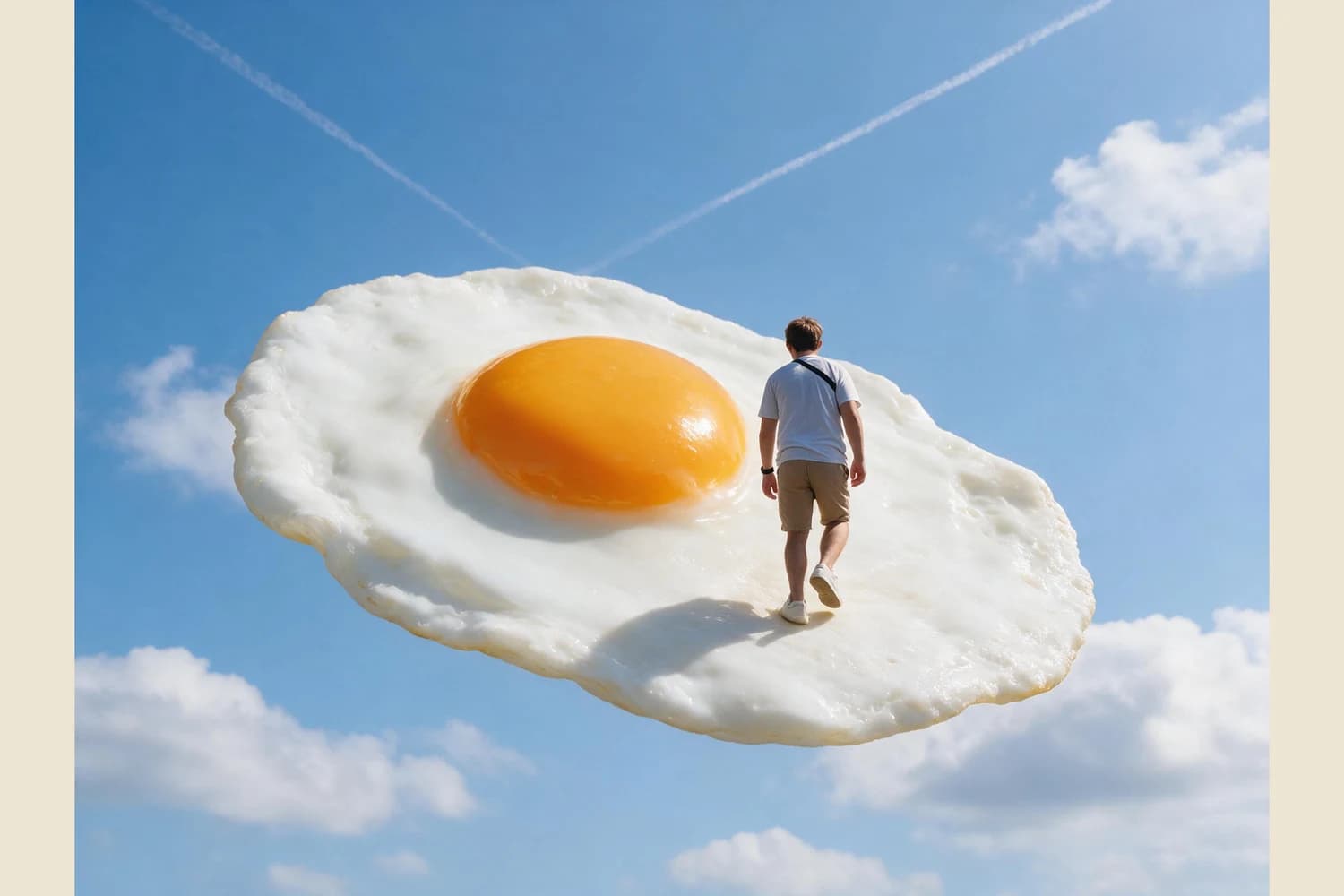
Choose an outdoor photo with one clearly separated subject, apply Skybound Surrealism, and compare clothing, body direction, visible limbs, carried objects, and contact points with the source. Treat the new sky, floating platform, shadows, and changed framing as generated fiction. The result is surreal artwork, not evidence that the depicted event occurred.
What the reviewed hill-to-sky example shows
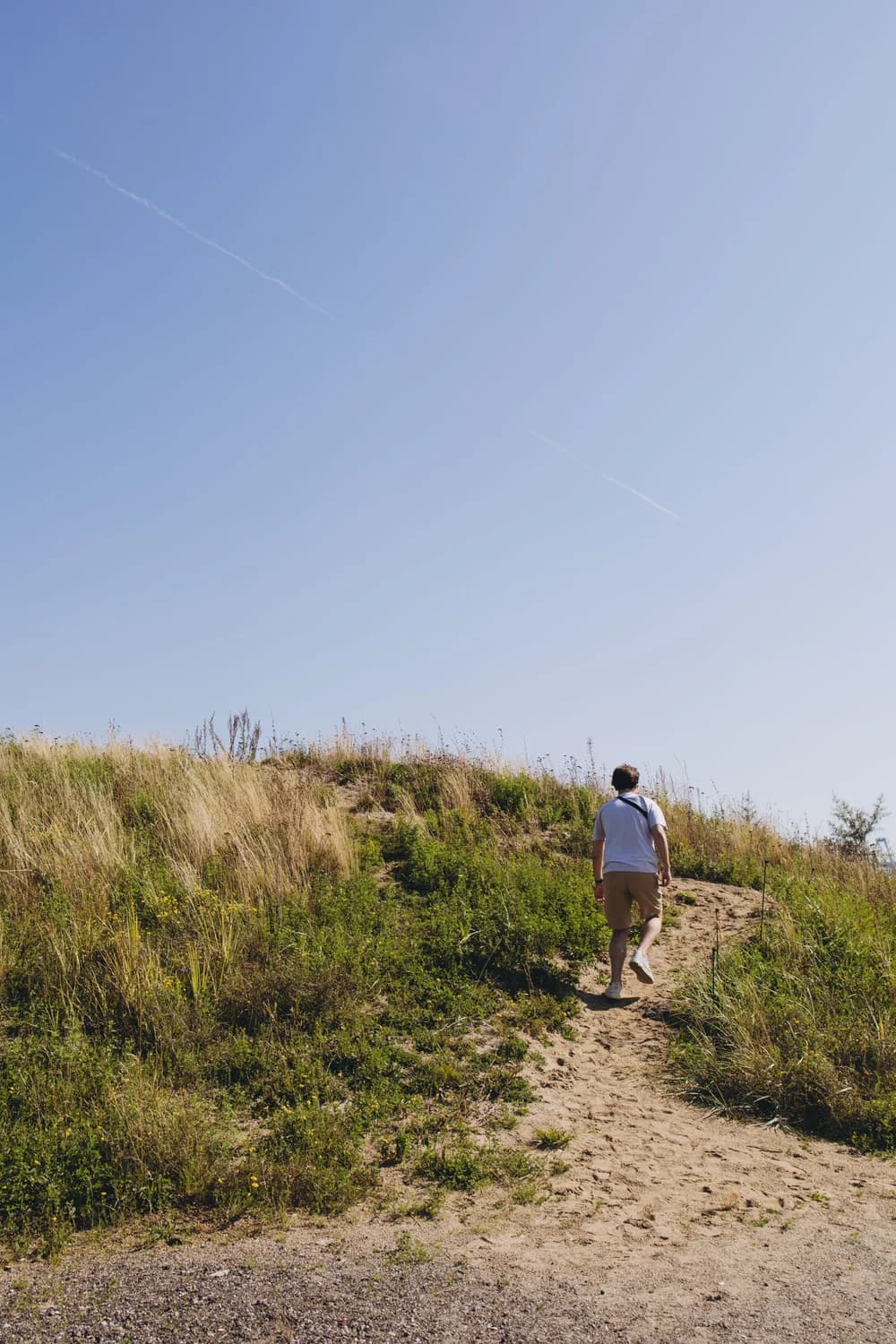
Margarita's source photograph shows one person from behind, walking up a sandy path through dry grass beneath a large clear sky. A white shirt, tan shorts, white shoes, dark cross-body strap, bent arms, and raised right foot are directly visible. The Imagild result keeps one back-facing walker with the same main clothing colors, strap direction, and walking action. It replaces the hill with a fried egg floating among clouds, creates a new contact shadow on the egg white, changes the vertical photograph to a horizontal composition, and enlarges the person relative to the frame. The face was not visible in the source, so this pair cannot establish facial continuity or exact identity.
A three-step source-aware workflow
- 01
Choose a subject with an open outline
Use a photograph where the main person, animal, or object does not merge into a crowded background. Record the visible facts before generating: subject count, body direction, clothing colors, carried items, visible hands and feet, and the original crop. The reviewed source works because one walker stands against the sky and hillside. It does not provide a face for comparison, so facial resemblance should not become a success criterion for this specific pair.
- 02
Run the Skill and divide retained cues from invented scenery
Open Skybound Surrealism, use a photo you have permission to transform, and keep the scene idea to one clear impossible relationship. After the result appears, make two lists. The first contains details that can be compared with the source, such as the white shirt, tan shorts, strap, pose, and walking direction. The second contains generated material, including the fried egg, clouds, new horizon, wider framing, and all shadows created for the composite.
- 03
Inspect contact, anatomy, and use context
Zoom in on feet, hands, straps, edges, and shadows. A floating surface still needs a readable point of contact, but a convincing shadow does not make the event real. Check whether the changed aspect ratio cuts off something important and whether the subject scale suits the intended post or cover. Export the accepted raster image, then add exact captions in a separate layout pass. Label the work as generated or AI-modified whenever the publishing context could imply documentary photography.
Three decisions that keep the surreal image credible
- Use one impossible idea, not several competing effects
- The reviewed result has one dominant invention: an everyday fried egg becomes a platform in the sky. That simple relationship leaves enough visual space to read the walker. Adding unrelated creatures, planets, buildings, and lettering would weaken the source comparison and make edge errors harder to notice. A restrained scene also gives a viewer a clear answer to what changed and what remained from the photograph.
- Describe visible continuity without claiming exact identity
- This pair supports comparison of the person's back-facing silhouette, clothes, strap, and action. It cannot support a statement about the face because neither source nor result provides a usable facial view. Even when a face is visible in another source, describe the observable resemblance and review the output carefully. Do not present a generative result as biometric proof or as a record of a real trip, performance, or location.
- Match the disclosure to the risk of misunderstanding
- A whimsical art account may need only a short generated-image label. A travel story, news-like feed, brand campaign, or personal-history post needs a clearer caption because viewers may otherwise infer that the floating scene happened. Keep the original file separately, preserve its real date and location metadata outside the artwork, and avoid attaching invented place names or factual claims to the surreal result.
Official sources checked
Questions about surreal photo transformations
Does the result prove the walker was photographed on the floating egg?
No. The source contains a real hillside and path. The egg, clouds, contact shadow, and horizontal sky composition are generated additions. The result is a fictional visual interpretation and should not be captioned as a documentary event.
Which details should I compare with my source photo?
Check subject count, silhouette, body direction, visible hands and feet, clothing colors, accessories, carried objects, and every contact edge. Also compare the original crop with the new aspect ratio so a useful source detail is not silently lost.
Is the output a layered composite I can edit object by object?
No. The delivered result is a single raster image, not a layered scene file or a documentary photograph. Make precise typography, print sizing, and further object-level corrections in a suitable editing or layout application after export.